
An accounting firm’s .accdb sat on a network share that hosted twelve concurrent users, and this morning three of them called saying Access threw “Unrecognized database format” and refused to open the file. A small manufacturer’s parts inventory database — a Microsoft Access application built in 2011, still driving the shop floor — came back from a NAS reboot with a .laccdb lock file that refuses to clear and a main .accdb that opens but shows only half of its tables. A legal practice’s case-tracking system, still running on a copy of Access 2003 with an .mdb backend on a mapped drive, reports “The database is in an inconsistent state” every time it opens and then locks up when anyone tries to write.
We recover Microsoft Access databases when the storage under them fails. Access is one of the most common SMB business database platforms in the world — it powers accounting workflows, case management, inventory systems, small ERPs, and thousands of workflow applications that have been running quietly for a decade or more. When those applications break because a hard drive failed, a NAS crashed, a network share dropped mid-write, or the underlying file system corrupted an inode, standard Access repair does not help. Storage-level recovery does.
How Access files break at the storage layer
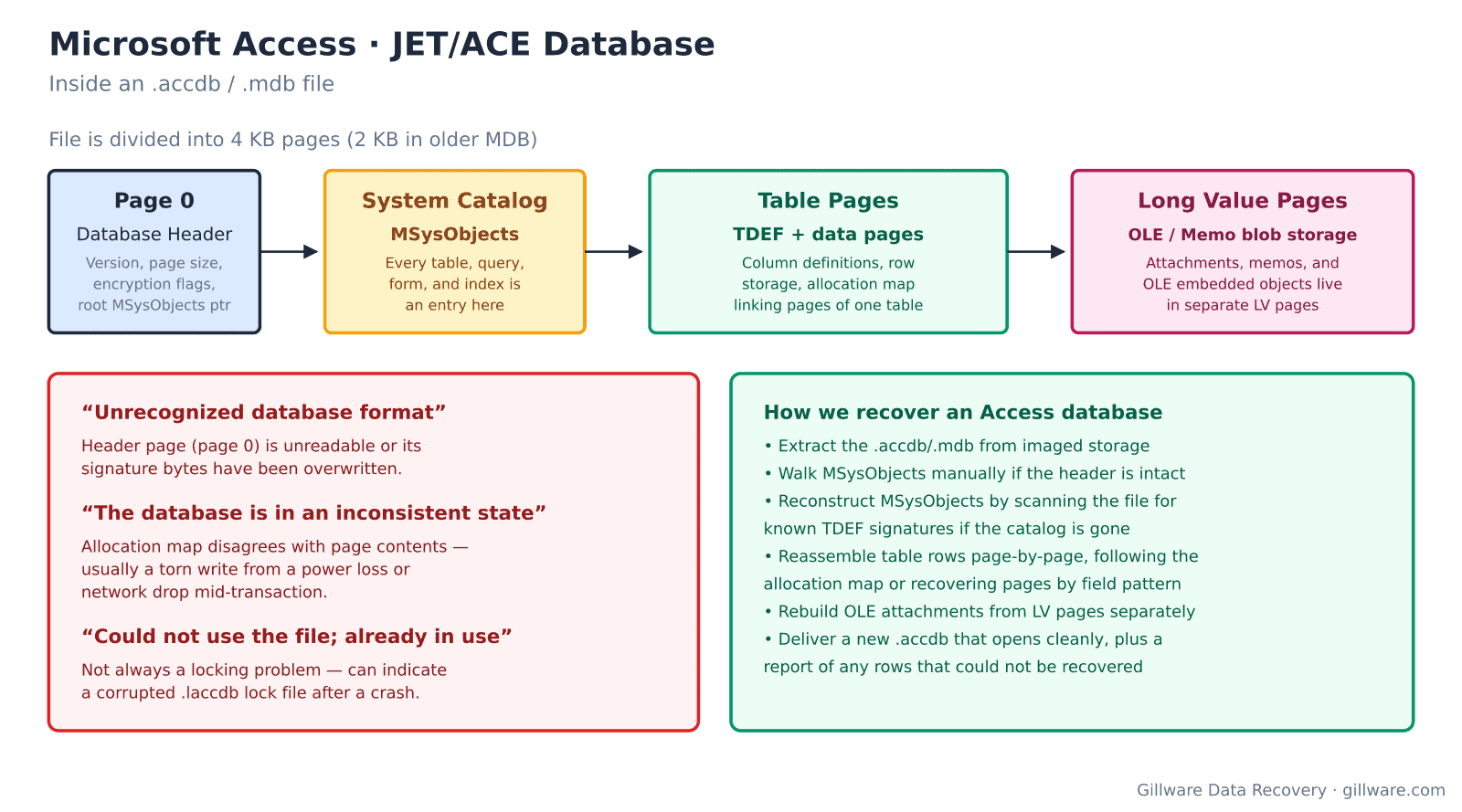
An Access .accdb or .mdb file is a page-based database, using 4 KB pages in modern .accdb files and 2 KB pages in older .mdb files. Page 0 is the database header, carrying the version signature, page size, encryption flags, and a pointer to the root of the MSysObjects system catalog. MSysObjects is where every table, query, form, module, and index in the database is defined — if MSysObjects is damaged, Access loses track of what the database contains. Table definitions (TDEF pages) point to chains of data pages. Long values — OLE objects, memo fields, attachment blobs — live in separate LV pages linked from the tables that reference them.
Storage failures produce specific classes of Access corruption. A torn write during a commit can leave the allocation map pointing to pages whose contents belong to a previous transaction. A network drop mid-save can leave the .accdb in a state where MSysObjects thinks a table has more pages than the allocation map records. A dying NAS drive can return pages that pass structural checks but contain data from a wear-leveled block that used to hold something else. When any of that happens, Access typically refuses to open the file, or opens it and reports it as corrupt after a few queries.
Error messages that indicate storage-level corruption
- Unrecognized database format ‘path\file.accdb’ — the file’s header page (page 0) is unreadable or its signature bytes have been overwritten. Almost always caused by a torn write to the header or a failing sector at the beginning of the file.
- The database is in an inconsistent state — the allocation map disagrees with the actual page contents. Usually a torn write from a power loss, a network drop mid-transaction, or a filesystem crash that left the file partially written.
- The Microsoft Access database engine cannot open or write to the file ‘…’. It is already opened exclusively by another user, or you need permission — often misinterpreted as a locking problem when it is really a corrupted .laccdb lock file that Access cannot clear because the underlying storage will not let it be deleted.
- The database has been converted from a prior version by using the DAO CompactDatabase method paired with the file refusing to open — a compact operation was interrupted mid-write and the .accdb is now half in the old format and half in the new.
- Error 3343: Unrecognized database format variant during a linked-table refresh — the backend .accdb on the file share is corrupt even though the frontend on the workstation opens fine.
- Error 3049: Cannot open database. It may not be a database that your application recognizes, or the file may be corrupt — general corruption message, usually accompanying underlying storage that has been returning bad reads.
- Error 3197: The Microsoft Access database engine stopped the process because you and another user are attempting to change the same data at the same time repeated across users on data that has not changed — typical when a NAS or file share is corrupting pages during writes and Access is detecting the inconsistency between what it wrote and what it reads back.
How we recover an Access database
The drive or NAS the .accdb is living on gets imaged first. When the file lives on a workstation, we image the workstation’s drive. When it lives on a NAS or file server, we image the NAS drives or the server’s storage. Nothing else happens before imaging is complete and verified.
Filesystem reconstruction comes next. For NTFS — the overwhelming majority of Access deployments — we parse the MFT from the image and extract the .accdb by its file record and cluster runs. When the NTFS itself has been damaged, we reconstruct the filesystem from raw sectors and pull the .accdb out by its distinctive file signature.
With the extracted .accdb, the recovery approach depends on which part of the file is damaged. When page 0 is intact and MSysObjects is reachable, we walk the catalog normally, following table definitions to their data pages, and preserve every intact page. When MSysObjects is unreachable but page 0 survives, we scan the file for TDEF page signatures and reconstruct the catalog from the surviving table definitions. When page 0 itself is destroyed, we identify the file’s Access version by pattern-matching against known signatures deeper in the file, then work outward from the surviving TDEF pages.
Data page reassembly follows the allocation map when it’s intact and follows the tables’ page chain pointers when it’s not. Rows that survive intact go into the reconstructed table. Rows that are torn get inspected individually — often the top of a row is fine but a variable-length column has been truncated, in which case we recover the fixed portion and flag the truncated field. Attachments and OLE objects in LV pages are recovered separately, referenced back to their owning rows by the LV pointers that the table pages carry. The deliverable is a fresh .accdb that opens cleanly in Access, plus a report of any rows that could not be recovered.
Split databases and linked tables
Many Access applications are split into a frontend .accdb on each user’s workstation and a backend .accdb on a network share. When corruption strikes, it’s almost always the backend. We work from whichever copy of the backend is most recoverable — sometimes a nightly backup from a week ago is more intact than the live copy, and combining the backup with recent user actions from the frontends is the path to the least data loss. When multiple users have local frontend caches with unsaved changes, we recover the backend first and then work through any unsaved-change resolution the customer needs.
What we don’t do
We do not sell an Access repair utility. There are several on the market and they can be useful for logical corruption on undamaged storage — but they have no way to work with a failed drive or corrupted NAS, and running them against storage that is still failing typically makes recovery harder. We also do not undo intentional deletes that Access committed cleanly — DELETE queries that ran against healthy storage and were flushed to disk cannot be reversed. Point-in-time recovery from Access is a job for your backup rotation, not for storage recovery.
Related recovery services
Access databases usually share storage with the rest of an SMB’s data. See our database data recovery hub, Windows data recovery for host-level issues, NAS data recovery when the backend lives on a network share, and QuickBooks recovery for the other most-common SMB business database.
Talk to an Access recovery engineer
Free consultation, free evaluation, free inbound shipping. If we can’t recover your data, you don’t pay.
877-624-7206