
The RAID 5 rebuild failed at 78% and the production Oracle instance came up with tablespaces marked offline. The ASM diskgroup on the SAN is reporting ORA-15042 — missing disks — because two SSDs failed within the same rebuild window. A datafile that mounted fine yesterday now throws ORA-01578 the moment a specific table is queried, and the block number the error points to keeps changing. Or a Linux host that hosted a small Oracle XE database for a manufacturing line came back from a power event with the entire ORACLE_HOME directory returning I/O errors, and the last cold backup is three months old.
We recover Oracle databases when the storage under them fails. That distinction matters: we are not an Oracle support alternative, we do not license page-repair utilities, we do not replace RMAN or DBCA in a working environment. What we do is professional data recovery on the physical devices — drives, SSDs, RAID arrays, SAN LUNs, ASM disks — that the datafiles were living on, then reconstruct the datafiles themselves when Oracle refuses to open them.
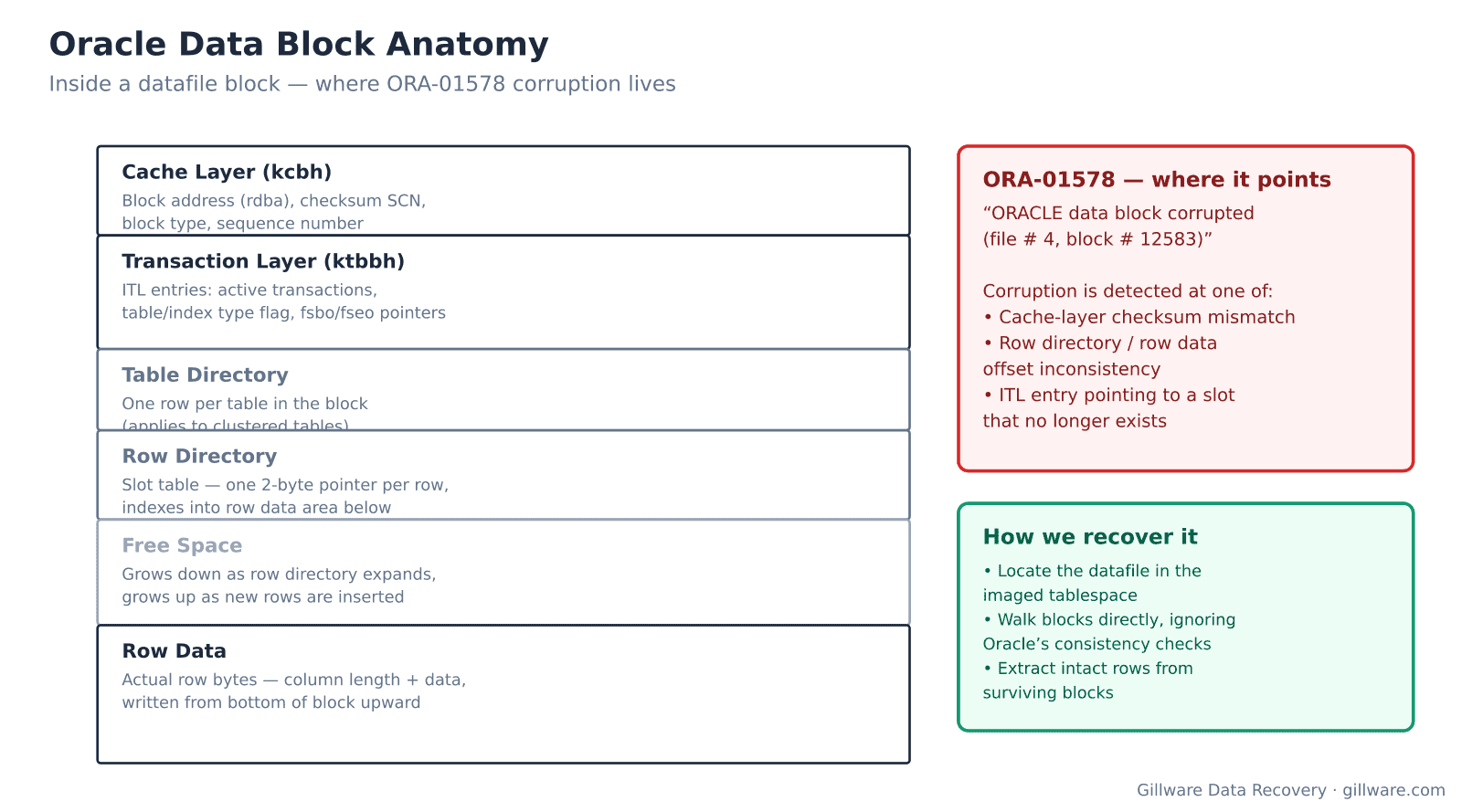
Where Oracle corruption comes from when hardware is involved
An Oracle datafile is a series of blocks, typically 8 KB each, organized into extents that belong to segments that belong to tablespaces. Every block carries a cache-layer header with a checksum, a transaction layer that tracks the ITL entries for uncommitted work, a row directory that indexes into the row data area below, and the row data itself, packed from the bottom of the block upward. When any of that becomes inconsistent, Oracle raises ORA-01578 and refuses to serve the block.
What causes that inconsistency, when the database code itself is not the problem, comes down to storage. A RAID array that dropped a disk and then dropped a second before rebuild completes will start returning stripes assembled from stale parity. Oracle will read a block whose cache layer says it belongs to file 4, block 12583, but whose row data belongs to file 6, block 900,000. Checksums will fail. ASM does its own striping across candidate disks and, when a candidate disk fails silently, will hand Oracle blocks stitched from two different points in time. SSDs can return blocks that pass checksum but contain the contents of a wear-leveled erase block from an hour ago, because the FTL mapping table got corrupted. SAN thin-provisioned LUNs can return zero-filled reads when the underlying pool runs out of space during a write.
Error signatures that point to storage, not to Oracle
Certain error messages consistently indicate physical corruption rather than a database engine issue. When we see any of these paired with a hardware event, we approach the case as storage recovery first, database work second.
- ORA-01578: ORACLE data block corrupted (file # X, block # Y) — the canonical block corruption error. Cache-layer checksum has failed or the block’s internal offsets are inconsistent. When multiple different blocks report the error across the same file, the problem is almost always at the storage level.
- ORA-27063: number of bytes read/written is incorrect — the OS returned fewer bytes than Oracle asked for, or more. Nearly always a failing drive, a filesystem that has lost track of file extents, or a SAN path that dropped mid-transfer.
- ORA-27041: unable to open file paired with OS-level 5 or 22 — the file exists in the data dictionary but the filesystem can no longer serve it. Common after a filesystem corruption event where the datafile’s inode was damaged.
- ORA-19566: exceeded limit of X corrupt blocks during RMAN operations — RMAN is finding more damage than the DB_BLOCK_CHECKING setting allows it to skip. Physical corruption in the datafiles.
- ORA-15042: ASM disk missing from disk group or ORA-15196: invalid ASM block header — an ASM candidate disk went offline or is returning damaged headers. If the disk group is not properly redundant, the diskgroup itself is now unmountable.
- ORA-00600 [kcbz_check_objd_typ_1] and similar internal errors with kcb (buffer cache) or kdt (table access) argument prefixes — internal consistency checks tripped by a block that made it past the checksum but has structurally invalid contents.
- DBVERIFY: Page X is influx — most likely media corrupt — the dbv utility’s specific verdict when a block is torn between two writes.
How we recover an Oracle datafile
The process begins the moment the drives arrive. Every disk involved — ASM candidates, RAID members, SAN backing storage — is cloned to a bit-exact image. The originals go back in an anti-static bag and are not touched again until the case closes. Every operation from this point on happens against the images.
Next, we reconstruct the filesystem or ASM diskgroup the datafiles were living on. ASM is a first-class filesystem to us at this stage — we walk the AU (allocation unit) map, rebuild the file directory, and extract the individual datafiles by their ASM file numbers. For traditional filesystems, we parse the on-disk NTFS or ext4 or XFS structures and pull the datafiles out by name and inode. When a RAID array is involved, we determine stripe geometry, block size, and disk order from the data itself, because a controller that failed mid-operation cannot be trusted about its own configuration.
With clean datafiles in hand, we walk them block by block. Blocks that pass cache-layer checksum and internal offset checks get preserved as-is. Blocks that fail get inspected: sometimes the block header is intact but the row data is torn, and rows above the tear can still be extracted; sometimes the block belongs to a wrong page and we can locate the correct block elsewhere in the imaged storage. The output is a datafile that opens against the original tablespace metadata, or, when the control files and metadata catalog are unrecoverable, a set of extracted tables in a form suitable for import into a fresh instance.
Files we work with
- .dbf datafiles — the primary target. Tablespaces map to one or more datafiles; recovery focuses here.
- Control files (.ctl) — small but critical. The control file catalogs which datafiles belong to which tablespace, SCN synchronization, and RMAN backup metadata. Recovering the control file dictates whether we can bring the database up in-place or must extract tables separately.
- Online redo logs (.log) — recent transaction history. If the datafiles are stale but the redo logs survived, we can often replay forward to reduce data loss.
- Archived redo logs (.arc) — long-term transaction history. Critical for point-in-time recovery when the redo chain is intact.
- RMAN backup pieces — when the running database is unrecoverable but backup pieces exist on separately-failed storage, we can extract from the backup format directly.
What we don’t do
We are not a substitute for RMAN in a healthy environment. If your Oracle instance is running fine and you need to migrate, patch, upgrade, or refresh a schema, that is Oracle DBA work, not data recovery work. We also do not undo cleanly-committed DROP TABLE or TRUNCATE statements — if Oracle wrote the DDL to the redo log, the log flushed, and the storage confirmed the write, there is nothing on disk for us to reconstruct from. Where we help is when the destructive operation happened alongside a hardware failure that stopped it from committing fully — a torn write of the redo log, a power event during the redo flush, a filesystem crash that left the datafile and redo in inconsistent states.
Related recovery services
Oracle databases often run alongside other systems that fail together during the same storage event. See also our database data recovery hub, SQL Server data recovery for Windows environments, RAID data recovery for the underlying storage layer, and server data recovery when the entire host has failed.
Talk to an Oracle recovery engineer
Free consultation, free evaluation, free inbound shipping. If we can’t recover your data, you don’t pay.
877-624-7206