
Exchange Server Data Recovery
The store won’t mount. The event log is a wall of red: JET errors in the -500s and -1000s, ESE complaining about missing log files, the mount attempt failing at Mounting database… over and over. Or the database mounted fine yesterday but today reports dirty shutdown and refuses to come up. Or a well-meaning administrator ran eseutil /p on the production EDB last night to “fix it,” and the database now mounts, but half the mailboxes are missing and the ones that remain are missing recent mail. Or the underlying volume — a VHDX inside a Hyper-V host, or a LUN on a SAN — came back from a storage event with the EDB present but no transaction logs.
Exchange recovery is not filesystem recovery. The database engine underneath Exchange — ESE, the same engine that runs Active Directory — is a transactional store with its own write-ahead log, its own checkpoint file, and its own strict rules about what makes a database consistent. The tools that “repair” an Exchange database work by rewriting the pages of the EDB to match what ESE thinks they should say, and when the answer is unclear, they discard rather than reconcile. That behavior is safe on a small, easily-rebuilt store. It is destructive on a production mail database that has drifted more than a few pages from consistency, and it is one of the top reasons Exchange cases arrive at our lab in worse condition than they left the customer’s rack.
This page walks through how the ESE engine actually stores and protects data, the small set of administrator actions that turn a recoverable Exchange server into an unrecoverable one, and what recovery looks like when a mailbox database is dirty in a way that the built-in tools can’t fix without cost.
The Exchange we’re talking about
Everything on this page refers to on-premises Exchange — Exchange Server 2016, 2019, and Subscription Edition (Exchange SE) — where the mailbox database is a file you can point at, image, and parse. Exchange Online is not that; if the store is in the cloud, this is not the page you need. Nearly every on-prem Exchange case we take in involves a mailbox database (.edb) file plus its transaction log stream, either sitting on a physical volume, on a Hyper-V VHDX (see our Hyper-V data recovery page), or on a VMware VMDK. The recovery process is the same in all three cases once the volume is reconstructed.
Inside an Exchange mailbox database
An Exchange database is not a single file. It is an ESE database (.edb) plus a stream of transaction logs plus a checkpoint file, and the three of them together are the database. Missing or corrupted any one of them, and the whole is no longer trustworthy.
The EDB file is the on-disk store — a paged database file organized into 32-KB pages. Each page has a header, a checksum, and a page number, and pages are grouped into B-trees representing mailboxes, folders, message tables, indices, and internal metadata. The EDB is the eventual home of every message, but it is not the authoritative record of what has happened to that message most recently. That role belongs to the logs.
The transaction logs are the write-ahead log. They live in the same directory (or a separate log directory, if the administrator configured it that way) and are named E00.log for the current log and E0000000001.log, E0000000002.log, and so on for the sealed generations behind it. Each log file is exactly 1 MB (on modern Exchange), each records a stream of ESE operations, and each is written to disk before the corresponding pages of the EDB are updated. This is what makes ESE a transactional database: any change to any page passes through the log first, so a crash mid-write leaves the log with the truth of what happened and the EDB with a stale-but-consistent view of what happened up to the last flushed transaction.
The checkpoint file is E00.chk. It is small, it holds one piece of information — the log position up to which every change has been safely flushed into the EDB — and it is what tells ESE where to start replaying logs from when a database is brought online. Every log generation behind the checkpoint is available for truncation; every log generation ahead of the checkpoint is required for the database to reach consistency.
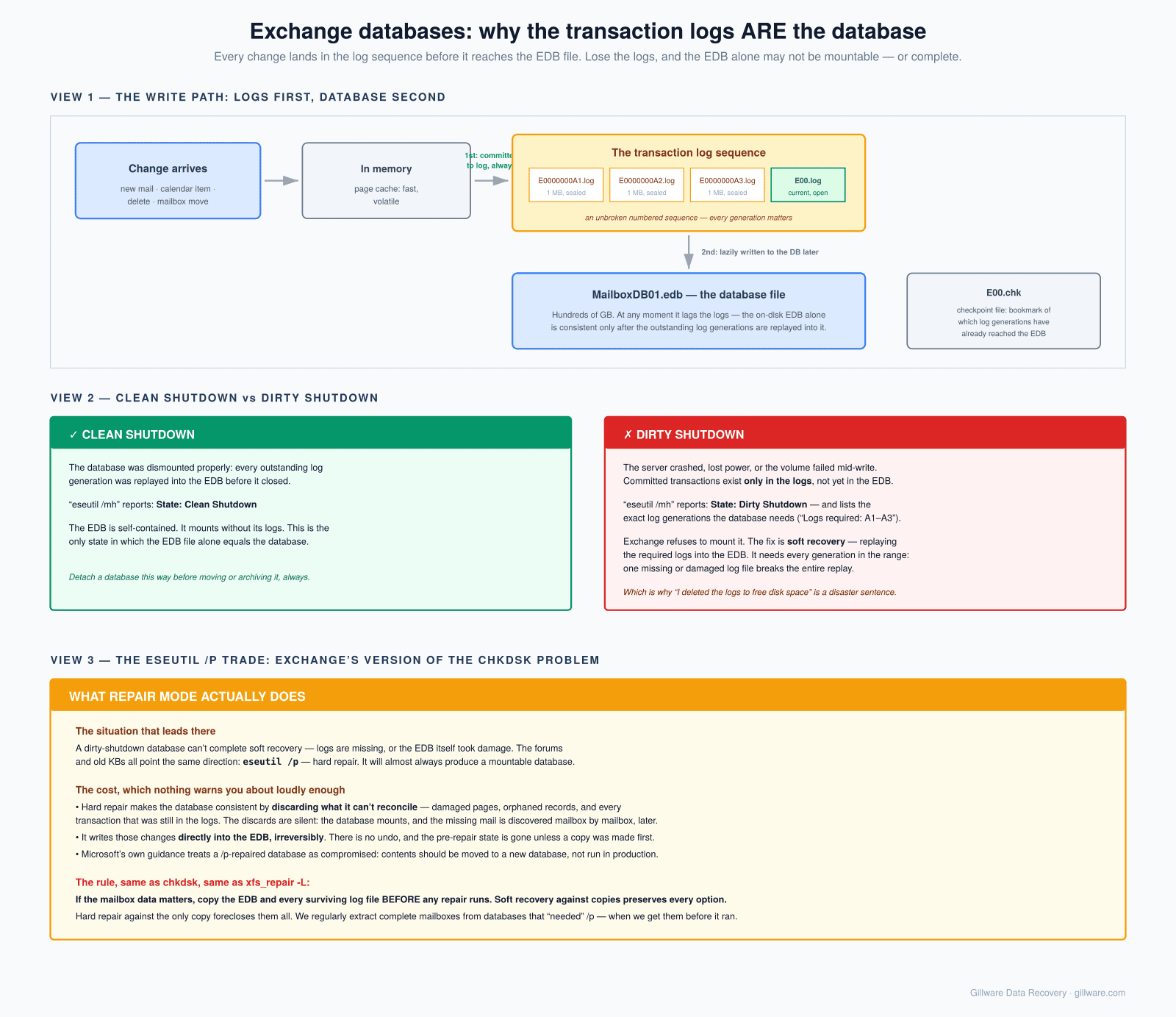
The write path in a single sentence: a client operation is committed to the current log file, the log is fsynced to disk, ESE reports the operation as complete, and the affected EDB pages are updated asynchronously in memory and eventually flushed to disk in whatever order ESE finds efficient. The EDB on disk is always behind the log. That is not a bug; that is the whole point of write-ahead logging, and it is the reason a mid-write crash almost never damages the database as long as the logs are intact.
Clean shutdown versus dirty shutdown
Every Exchange administrator eventually meets eseutil /mh, the ESE command that reads the header of a database file and reports its state. The two states that matter are Clean Shutdown and Dirty Shutdown, and the difference between them is the difference between a database that will mount and a database that will not.
Clean Shutdown means every transaction that was ever committed to a log has been flushed into the EDB, the checkpoint file has caught up to the tail of the log stream, and no log files ahead of the checkpoint are required for the database to be consistent. A database in this state can be mounted anywhere — you can copy the EDB to a completely different server, mount it, and it will come online. This is the state Exchange leaves a database in after a normal Dismount-MailboxDatabase, and it is the state most administrators think their databases are in most of the time. Most of the time, they are wrong.
Dirty Shutdown means the database has committed transactions in the logs that have not yet been flushed into the EDB. This is the ordinary state of any Exchange database that is running — open-and-in-use looks identical, from the header, to crashed-mid-flush. What separates a recoverable dirty shutdown from an unrecoverable one is the “logs required” range that eseutil /mh reports: a small range of log files, sitting next to the EDB, that ESE needs to replay to bring the database back to a clean state. Present them and run eseutil /r on the log prefix, and the database performs soft recovery — the logs are replayed forward, every committed transaction is written into its EDB pages, the checkpoint advances to the tail, and the database reaches Clean Shutdown. Mount it and it comes up.
Soft recovery is not a repair. It is the ordinary way an Exchange database comes back after any interruption — a server reboot, a failover, a Hyper-V host reset. The vast majority of “the database won’t mount” tickets are soft-recovery problems dressed up as something scarier, and the correct move on nearly all of them is to make sure every log file in the required range is present, then run eseutil /r against them and let ESE do what it was designed to do.
Missing or deleted transaction logs
The classic administrator mistake — and it accounts for a significant fraction of our Exchange caseload — is deleting the transaction logs.
The transaction log directory grows relentlessly on a busy Exchange server. Every 1 MB log file is sealed and archived when it fills, and even a modestly-sized organization can produce many gigabytes of logs per day. On a server where circular logging is disabled — the recommended configuration for anywhere backup is being taken — the logs are only truncated when a successful full or incremental backup completes. A backup that has been silently broken for months, plus a full log volume, plus an administrator who Googles “Exchange log volume full” and finds a stack of forum posts recommending manual deletion, is the recipe.
Once the logs ahead of the checkpoint are gone, the database is stuck. eseutil /mh reports Dirty Shutdown and lists a “logs required” range that no longer exists on disk. Soft recovery has nothing to replay. The database will not mount, and every clean way of bringing it up is closed.
What remains is bad options. And the worst option, unfortunately, is the one that is offered up front on almost every Google search: eseutil /p.
The eseutil /p problem
This section is on this page for the same reason that the NTFS page has a chkdsk section and the XFS page has an xfs_repair -L section. Every mature filesystem or database has a repair tool that appears to fix broken structures by making them consistent, and every one of those tools does that by silently discarding whatever it cannot reconcile. The details differ. The pattern is identical.
eseutil /p is Exchange’s “hard repair.” When run against a dirty database with missing logs, it does not replay transactions — there is nothing to replay from. Instead, it walks the pages of the EDB, checks each one’s checksum, tests its position in the B-trees it belongs to, and rewrites or discards whatever it decides is inconsistent. Torn pages are dropped. Pages whose position in a B-tree does not match are removed from that tree. Records that reference dropped pages are pruned. Entire subtrees, if they cross too many broken pages, are cut away. The database that emerges after eseutil /p will mount, because it has been rewritten into a state that is internally consistent by the only definition ESE cares about: every pointer resolves and every checksum verifies.
What it will not do is tell you what it dropped. There is no manifest. There is no “these mailboxes were affected.” What was in the discarded pages is gone, and the operation is irreversible — the original page contents were overwritten during the repair.
Almost every Exchange case that arrives at our lab post-eseutil-/p is worse than it would have been if the customer had shipped the volume to us untouched. In many of those cases, the original database plus the tail of the log stream still on disk would have supported a full soft recovery, and the drops caused by /p were entirely avoidable. In others, the logs were truly gone, and /p was going to happen no matter what — but the right sequence would have been to copy the entire EDB and log directory to another volume first, run /p against the copy, and preserve the original for a forensic recovery of what /p threw away.
The rule for any Exchange administrator standing over a dirty database is short: image the EDB and the log directory before running any repair, and do not run eseutil /p against the only copy that exists. Once /p has run against your only copy, the drops become permanent, and the additional work needed to get back what was thrown away goes from tractable to expensive to impossible depending on how far the repair got.
What Exchange recovery looks like at Gillware
When an Exchange server arrives here — or more often, when the underlying VHDX, VMDK, or LUN arrives here — the first thing that happens is a forensic image of the volume containing the database and its log directory. Nothing runs against the original.
From the image, we reconstruct the volume as it existed at the moment we received it. If the volume itself is damaged — a failed RAID member, a partially-encrypted host from a ransomware event, a Storage Spaces column offline — that reconstruction happens first, using the same tooling we apply to any RAID or NTFS case. Only when the underlying volume is coherent do we start reading the EDB.
From there the workflow depends on what state the EDB and logs are in. If the logs are intact, we run soft recovery against a copy of the database and hand the resulting clean database back for mounting. If the logs are missing or truncated, we do not run /p — we parse the EDB pages directly using our internal tools, extract the mailbox tables and message tables from the pages that are intact, and reconstruct as much of the mailbox contents as the underlying data permits. In practice, that means recovering messages and attachments to individual PST or EML files, per mailbox, with the folder structure preserved, and delivering those to the customer for import back into a rebuilt store.
The important property of this workflow is that it treats the original database as immutable evidence. Everything we hand back is derived from that evidence, and the customer gets the original image back too — in case a second recovery pass is ever wanted or a forensic question arises later.
When to send an Exchange server to us
The sooner the better. There are a few situations where the correct move is to stop and pick up the phone before running the next command:
- Any database that reports Dirty Shutdown, where the “logs required” range includes files that are no longer present on disk.
- Any database that has already had eseutil /p run against it and now mounts with missing mailboxes or missing folders — recovery of what /p discarded is a forensic job against the original database file if it still exists.
- Any Exchange server whose underlying volume — physical, virtual, or SAN-backed — is degraded or has failed. Do not attempt to mount the store until the volume itself is proven healthy on a byte-for-byte copy.
- Any Exchange server that has been hit by ransomware, especially where the backups are also encrypted or truncated. See our ransomware data recovery page for how we approach these cases.
- Any database on a VHDX or VMDK that will not mount because the guest volume itself is inconsistent — that is a container problem first and an Exchange problem second, and running Exchange tools against a guest volume with broken NTFS metadata is a good way to make both problems worse.
Cases in these categories are handled under our complex-case engagement terms. Every case begins with a no-cost evaluation — the server, the drives, or a forensic image comes in, we scope what recovery is possible, and you get a firm quote before any work is authorized. If we don’t recover data, there’s no charge for the attempt. Gillware has been recovering Exchange databases for more than two decades, across every version from Exchange 2003 forward through today’s Exchange SE, and the shape of the work has stayed the same even as the version numbers have moved: the logs tell the truth, the EDB catches up, and the repair tools discard whatever they can’t reconcile. Recovery is what you do instead.
Exchange database won’t mount or eseutil /p was already run?
Get a no-cost evaluation from Gillware’s engineers. Call 877-624-7206 or start a case online.