
bcachefs Data Recovery
A Proxmox host you set up as a bcachefs test rig eighteen months ago has become the production storage for a small team. You updated the host from kernel 6.9 to 6.12 to pick up a fix elsewhere. On reboot the volume refuses to mount — the kernel log is showing errors about feature flags the current bcachefs kernel code doesn’t recognize, or unrecognized on-disk structures, or a journal that won’t replay. Or the volume mounts read-only and every attempt to write returns EROFS. Or a device in a multi-device configuration failed and the pool won’t come up because bcachefs can’t reach quorum on the current superblock generation across the survivors.
bcachefs is the newest mainline Linux filesystem — merged into the kernel in early 2024 — and it’s still moving quickly. Deployment is concentrated in early adopters, home lab and Proxmox test rigs, developers building on the tiered-storage and encryption features, and a small number of production installations run by people who followed the project’s development for years before the mainline merge. The case volume in our lab is low but climbing. This page covers what we see, what recovery looks like on a filesystem whose on-disk format is still evolving, and where the honest limits are.
If your bcachefs volume has failed and the data on it matters, this is a Linux data recovery case with some specific characteristics. Below is what those characteristics are and how the recovery work adapts.
A short tour of bcachefs
bcachefs began as bcache — a Linux block-layer cache (fast device fronting a slow device) that shipped in the kernel starting in 2013. Its author, Kent Overstreet, rebuilt it into a general-purpose copy-on-write filesystem over the following decade. The mainline merge happened in Linux 6.7 (January 2024). It is currently marked experimental in most distributions, though this is a moving target — several distributions have shipped it in production configurations, and Proxmox VE ships bcachefs as an installer option.
The feature set that makes bcachefs interesting is also what makes it complex to recover from. The filesystem supports:
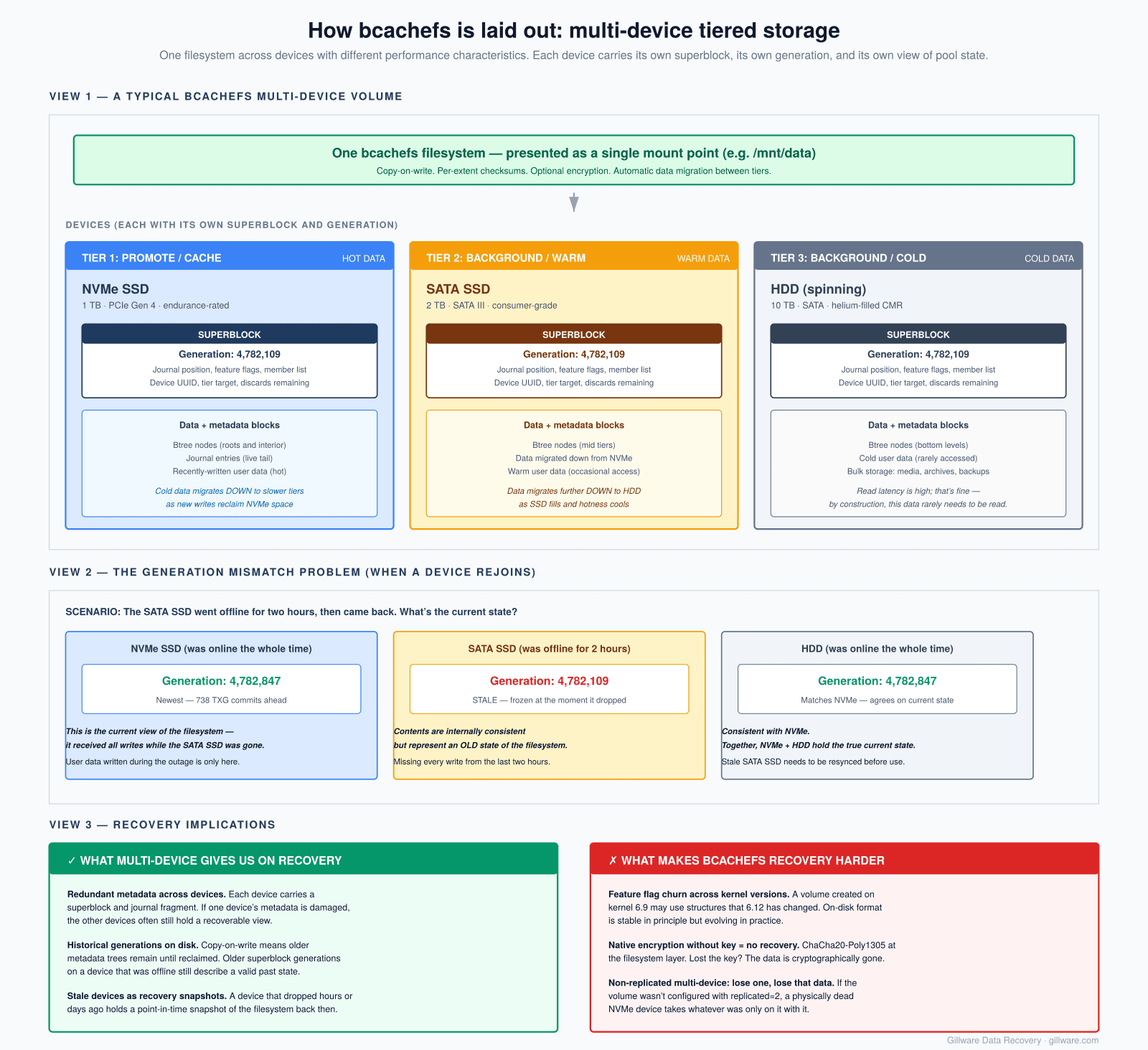
- Multi-device volumes with heterogeneous storage. A single bcachefs filesystem can span multiple physical devices with different performance characteristics — NVMe for hot data, SATA SSD for warm data, HDD for cold — and the filesystem migrates data between tiers automatically. Each device has its own on-disk superblock, and the volume’s state is the sum of the superblock generations across all devices.
- Copy-on-write with per-extent checksumming. Like Btrfs and ZFS, bcachefs never overwrites data in place. Every write allocates new space; older versions remain on disk until garbage-collected. Every extent carries a checksum, so silent corruption from failing storage is detected rather than accepted.
- Native encryption. Full-volume encryption is a first-class filesystem feature, keyed via the kernel keyring. This is different from LUKS-below-the-filesystem: bcachefs’s encryption is at the filesystem layer and interacts with the copy-on-write and checksumming behaviors.
- Compression. Per-file and per-directory compression via LZ4, Zstandard, or gzip. Compressed extents complicate recovery because the extent’s recorded size doesn’t match the recovered block count — the decompression has to be replayed to verify.
- Snapshots. Point-in-time snapshots of subvolumes, similar in spirit to Btrfs subvolumes but implemented differently.
- Redundancy modes. Replicated (like RAID 1) and erasure-coded (like RAID 5/6) modes are supported at the filesystem layer, so bcachefs itself provides the redundancy rather than sitting on top of mdadm or a hardware RAID controller.
The on-disk format has been stable since the mainline merge in the sense that the kernel developers now commit to backward compatibility — volumes created under older versions should still mount under newer versions. But feature flags continue to be added, and the specific behaviors of some features (particularly redundancy and snapshot handling) have evolved. In practice, an admin who installs a kernel update and finds their bcachefs volume won’t mount is likely running into the interaction between an older on-disk state and a newer kernel’s expectations about that state.
Where we see bcachefs in the lab
Because deployment is still concentrated in early adopters, the case profile is skewed differently from the mature filesystems. What we see so far, in rough order of frequency:
- Proxmox VE hosts. Proxmox added bcachefs as a supported filesystem option in the installer. A meaningful number of Proxmox admins tried it on secondary hosts or new deployments. When a Proxmox host goes down and bcachefs is involved, the recovery is typically both a Linux filesystem case and a virtualization case — each VM’s qcow2 or raw disk lives on the bcachefs volume, and both the filesystem and the guest disks have to come back.
- Home lab and self-built NAS. The tiered storage and native redundancy features are exactly what appeals to people building their own storage. bcachefs’s ability to combine an NVMe cache tier with spinning drives, without needing a separate cache layer like bcache-under-ext4, is the specific draw. When these builds fail, they fail in ways specific to bcachefs’s multi-device model.
- Developer workstations. Users following the project’s development have been running bcachefs on their personal systems for years. Cases from this population are usually recoveries the user has already tried themselves with the userspace tools and where the tools didn’t succeed.
- Small production deployments. A minority of users are running bcachefs in production for small teams. These cases carry higher stakes when they arrive.
We do not yet see bcachefs on consumer NAS platforms (Synology, QNAP, TerraMaster, ASUSTOR) — those vendors have not adopted it — and we don’t yet see it on large enterprise deployments. Both may change; we’ll update this page as it does.
Common failure patterns
The failure patterns we’re seeing cluster into a few categories, most of which are specific to the properties of a young filesystem on active development.
Kernel upgrade produces an unmountable volume. The most common category we see. A host running kernel X had a stable bcachefs volume. The kernel is upgraded to Y (either through a distribution update or a manual build). The volume won’t mount on Y. dmesg reports errors about feature flags, on-disk structures, or metadata versions that the new kernel doesn’t recognize the way the old one did. Sometimes the reverse: the new kernel implements a feature more strictly than the old one, and inconsistencies that the old kernel tolerated now block mount. Recovery approaches include mounting under an intermediate kernel version, using bcachefs fsck with specific options, or hand-parsing the on-disk state to determine what changed.
Journal replay failures. Like ext4 and XFS, bcachefs uses a journal for crash consistency. Unlike them, the journal is designed to be replayed regardless of the on-disk state, because the copy-on-write architecture means old data is still present. But the journal itself can be damaged — by storage errors during the crash, by corruption of the metadata that describes journal location, or by feature-flag mismatches. When journal replay fails, the volume typically won’t mount cleanly, though -o nofsck or the equivalent may bring it up in a degraded state.
Multi-device configurations with a missing or failed device. bcachefs’s multi-device support means that losing a device can leave the volume in various states depending on the redundancy configuration. Replicated configurations survive device loss (that’s the point). Non-replicated multi-device configurations don’t — the data on the missing device is gone, and whether the remaining metadata can be recovered depends on which device held which structures. Cases in this category require identifying the state of each surviving device before deciding recovery approach.
Superblock inconsistency across devices. Each device in a multi-device volume carries a superblock, and the volume’s canonical state is the highest superblock generation number seen across the devices. If one device was offline during a period of writes and then rejoined, its superblock is stale — and if that stale device becomes the only reachable copy (through a further failure of the other devices), the volume state reflects an older point in time. Recovery here often involves identifying which devices have which generations and choosing which state to bring back.
Encryption unlock failures. bcachefs’s native encryption is keyed via the kernel keyring. If the key is lost — because the keyfile was on another volume that also failed, because the passphrase is forgotten, or because the setup was done in a way that didn’t preserve the key durably — the volume’s data is cryptographically inaccessible regardless of the underlying storage’s health. The encryption uses well-vetted primitives (ChaCha20-Poly1305); there is no lab technique that recovers the plaintext from an encrypted bcachefs volume without the key.
Snapshot corruption. Cases involving bcachefs subvolume snapshots are still uncommon in our lab, but the pattern will grow as deployments accumulate snapshot history. The failure modes are analogous to Btrfs snapshot problems — corruption in the metadata trees that describe snapshot relationships — but bcachefs’s implementation differs, and recovery requires filesystem-specific work.
How we approach bcachefs recoveries
The first step, as on every case, is imaging. Because bcachefs volumes are frequently multi-device, this typically means imaging every physical device in the volume individually. For NVMe devices this is straightforward; for SATA SSDs and HDDs it’s the same imaging process we use on any drive. Cases where one of the devices has a physical failure preventing a clean image get that device’s repair work done first — head-stack replacement in the cleanroom for HDDs, controller board or NAND-level work for SSDs and NVMe.
With images in hand, the recovery approach depends on the failure category. The tools we use include:
- bcachefs-tools userspace utilities. The upstream toolset includes
bcachefs fsck,bcachefs list,bcachefs show-super, and related commands. On cases where the volume state is recoverable through standard means — superblock backups intact, journal replayable, no unrecognized structures — running the userspace tools against the images (never the source devices) is often sufficient. This is the class of case where DIY recovery would have worked if the admin had known the tools existed. - Cross-kernel mounting. For cases involving kernel-version-specific incompatibility, we can mount the images under a specific kernel version that matches the volume’s last-known-good state. The tooling and kernel version are chosen to bring the volume up as it existed before the upgrade that broke it.
- Hand-parsing of on-disk structures. Where the standard tools can’t make sense of the volume, the on-disk format is documented in the kernel source and reads recoverable structures directly. bcachefs’s on-disk format uses well-defined structures — superblocks with magic numbers, journal entries with fixed layouts, btree nodes with distinctive headers — that can be located and parsed against damaged volumes even when the tools refuse to mount.
- Multi-device state reconciliation. For volumes where devices disagree about superblock generation, the images of all devices are compared and the specific write history that led to the divergence is reconstructed. In some cases the correct recovery is the highest generation reachable; in others (particularly when one device has been offline and the volume has since been damaged) the older generation is what recovers usable data.
Our internal tools were designed for filesystems with mature on-disk documentation. bcachefs is younger than any of the other filesystems we cover, and our tooling for it is correspondingly less mature — more of the work is engineer-driven on individual cases. As the format stabilizes and case volume grows, this will move toward more automated handling.
What not to do while the volume is offline
If your bcachefs volume has failed, several common reactions can make recovery harder or impossible.
- Don’t run
bcachefs fsckwith repair options against the live devices. The tool will happily attempt to write repairs to the source, and if the volume state is such that the tool’s repair heuristics are wrong for your specific damage, the repair writes can compound the problem. Run it against images. - Don’t reformat with
bcachefs formatto “start clean.” Reformatting writes a new superblock and initial metadata structures over the existing on-disk state, making recovery of the previous filesystem significantly harder. - Don’t upgrade the kernel further looking for a fix. If a kernel update was what caused the failure, further updates are more likely to compound the incompatibility than to fix it. The right move is to identify the kernel version that last worked, not to keep moving forward.
- Don’t remove a device from a multi-device volume without understanding what data lives on it. bcachefs’s device removal command assumes the volume is otherwise healthy and rebalances data before removing the device; against a failed volume, the same command can accelerate data loss.
- Don’t attempt to force-import or force-mount with unsafe options unless you understand the specific behavior each option is asking for. Options that let the filesystem “proceed anyway” past inconsistency checks are typically for developer debugging, not for production recovery.
- Don’t discard or trim the devices. Some troubleshooting guides suggest running
blkdiscardorfstrimas part of recovery. Against a failed bcachefs volume, either of these can free blocks that still hold recoverable data.
Honest limits
bcachefs recovery is genuinely harder than recovery on more mature filesystems, and it’s honest to say so up front. The reasons are structural rather than technical.
The on-disk format has evolved through the mainline development period, so a volume that was created eighteen months ago may use structures that don’t match current documentation exactly. The public documentation of the format is thinner than for ext4, XFS, Btrfs, or ZFS — the authoritative reference is the kernel source itself. The population of engineers with deep bcachefs experience is small, both inside and outside data recovery labs. Cases that involve unusual configurations or damage patterns that upstream hasn’t published guidance on will take longer to work through.
The specific limits that apply to bcachefs recovery today:
- Encrypted volumes without the encryption key are not recoverable. This isn’t bcachefs-specific — it applies to any modern encryption scheme — but it’s worth stating clearly.
- Volumes with substantial destructive tool use during the DIY phase may be beyond recovery even where the original damage was minor. This applies to every filesystem, but bcachefs’s copy-on-write design means damage from repair attempts can propagate through more of the volume than on a journal-based filesystem.
- Volumes whose primary storage device physically failed in ways that prevent imaging are recoverable only to the extent that the failed hardware can be brought back long enough to complete an image. On bcachefs’s multi-device configurations, a single failed device may still be a total loss if it held metadata that isn’t replicated elsewhere.
- Realistic recovery timelines for bcachefs cases run longer than for mature filesystems. We tell you this before we start.
How the engagement works for bcachefs cases
bcachefs cases are almost always in our complex-case category rather than our standard risk-free single-drive category. Engineering hours per case are higher than average, and outcomes are less predictable in advance than they are on mature filesystems.
The engagement structure is the one we use for other complex Linux work: free initial consultation, a clear conversation about realistic outcome ranges, evaluation phase that may be free or fixed-price depending on what’s needed to safely image the source devices, and (on the recoveries where it applies) engineering charges that are explained clearly and in writing before any work begins. You decide whether to proceed on those terms. No surprise billing at the end.
For related filesystem recoveries, see our Btrfs recovery page (the closest analog to bcachefs among mature filesystems), our ZFS recovery page (which shares many of bcachefs’s copy-on-write concepts), and our Linux data recovery hub for the broader picture.
bcachefs Volume Failed? Let’s Take a Look
Free initial consultation on bcachefs cases. Engagement terms agreed in writing before any work begins. No surprise billing.
Or call us: 877-624-7206